This page was generated from /home/docs/checkouts/readthedocs.org/user_builds/blm/checkouts/latest/docs/tutorials/tutorial-5-Scatter_plot_datetime.ipynb.
Interactive online version:
 Slideshow:

4.5. Getting subset of time series + Scatter plot
Here you can learn how to:
- plot time series in points (scatter plot)
- Get subset of time series data and plot them
First, some packages:
[3]:
# These packages are necessary later on. Load all the packages in one place for consistency
import numpy as np
import matplotlib.pyplot as plt
import pandas as pd
from pathlib import Path
import datetime
Let’s load the data:
[5]:
#The path of the directory where all AMF data are
path_dir = Path.cwd()/'data'/'1'
name_of_site = 'CA-Obs_clean.csv.gz'
path_data = path_dir/name_of_site
path_data.resolve()
df_data = pd.read_csv(path_data, index_col='time',parse_dates=['time'])
df_data.head()
[5]:
| WS | RH | TA | PA | WD | P | SWIN | LWIN | SWOUT | LWOUT | NETRAD | H | LE | |
|---|---|---|---|---|---|---|---|---|---|---|---|---|---|
| time | |||||||||||||
| 1997-01-01 00:30:00 | 2.988 | 73.036 | -24.570 | 93.942 | 102.84 | NaN | -0.14 | 213.39 | 0.01 | 214.83 | -1.59 | NaN | NaN |
| 1997-01-01 01:00:00 | 2.671 | 73.146 | -24.562 | 93.887 | 96.09 | NaN | -0.03 | 216.73 | 0.03 | 215.03 | 1.64 | NaN | NaN |
| 1997-01-01 01:30:00 | 2.303 | 73.151 | -24.431 | 93.934 | 112.34 | NaN | 0.24 | 223.46 | 0.02 | 215.91 | 7.77 | NaN | NaN |
| 1997-01-01 02:00:00 | 2.789 | 73.093 | -24.379 | 93.917 | 109.16 | NaN | -0.04 | 218.32 | 0.00 | 215.72 | 2.56 | NaN | NaN |
| 1997-01-01 02:30:00 | 2.274 | 73.140 | -24.284 | 93.977 | 115.74 | NaN | 0.14 | 217.89 | 0.01 | 215.99 | 2.02 | NaN | NaN |
Let’s have a plot of Net radiation:
[23]:
df_data['NETRAD'].plot(figsize=(12,5))
[23]:
<matplotlib.axes._subplots.AxesSubplot at 0x126df3400>

If you like to focus in particular part of the data, you use the following feature of pandas package (DataFrame.loc(index1:index2)):
[27]:
df_sub=df_data.loc['2002 07 01':'2002 07 30']
df_sub.head()
[27]:
| WS | RH | TA | PA | WD | P | SWIN | LWIN | SWOUT | LWOUT | NETRAD | H | LE | |
|---|---|---|---|---|---|---|---|---|---|---|---|---|---|
| time | |||||||||||||
| 2002-07-01 00:00:00 | 3.508 | 51.637 | 14.268 | 93.494 | 266.48 | 0.0 | 0.13 | 286.54 | -0.20 | 361.24 | -74.37 | -3.451 | 0.175 |
| 2002-07-01 00:30:00 | 3.183 | 53.221 | 13.799 | 93.509 | 265.86 | 0.0 | 0.07 | 282.77 | -0.23 | 358.10 | -75.02 | NaN | NaN |
| 2002-07-01 01:00:00 | 3.759 | 55.664 | 13.182 | 93.506 | 266.07 | 0.0 | -0.11 | 281.14 | -0.14 | 356.13 | -74.96 | -14.770 | 1.628 |
| 2002-07-01 01:30:00 | 4.518 | 52.553 | 13.217 | 93.500 | 276.19 | 0.0 | 0.02 | 282.81 | 0.15 | 362.15 | -79.47 | -69.300 | 12.360 |
| 2002-07-01 02:00:00 | 3.940 | 52.343 | 13.150 | 93.484 | 275.58 | 0.0 | -0.35 | 282.55 | 0.15 | 362.48 | -80.43 | -35.270 | 3.713 |
[28]:
df_sub.index
[28]:
DatetimeIndex(['2002-07-01 00:00:00', '2002-07-01 00:30:00',
               '2002-07-01 01:00:00', '2002-07-01 01:30:00',
               '2002-07-01 02:00:00', '2002-07-01 02:30:00',
               '2002-07-01 03:00:00', '2002-07-01 03:30:00',
               '2002-07-01 04:00:00', '2002-07-01 04:30:00',
               ...
               '2002-07-30 19:00:00', '2002-07-30 19:30:00',
               '2002-07-30 20:00:00', '2002-07-30 20:30:00',
               '2002-07-30 21:00:00', '2002-07-30 21:30:00',
               '2002-07-30 22:00:00', '2002-07-30 22:30:00',
               '2002-07-30 23:00:00', '2002-07-30 23:30:00'],
              dtype='datetime64[ns]', name='time', length=1440, freq=None)
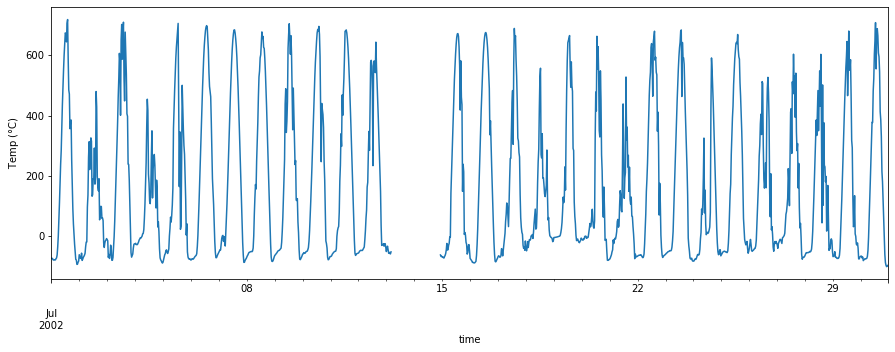
as you can see, we have a subset of df_data which contains the data from July 2002. Now let’s plot it:
[75]:
df_sub['NETRAD'].plot(figsize=(15,5))
plt.ylabel('Temp ($\degree$C)')
[75]:
Text(0, 0.5, 'Temp ($\\degree$C)')
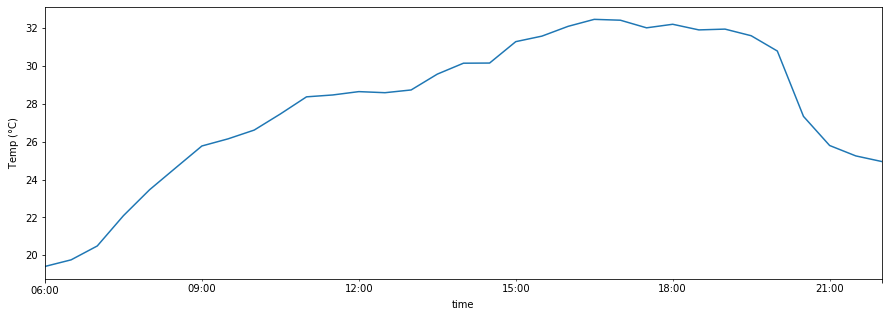
You can even specify the date and time of interest in the subset:
[74]:
df_sub.loc['2002 07 12 6:00:00':'2002 07 12 22:00:00']['TA'].plot(figsize=(15,5))
plt.ylabel('Temp ($\degree$C)')
[74]:
Text(0, 0.5, 'Temp ($\\degree$C)')
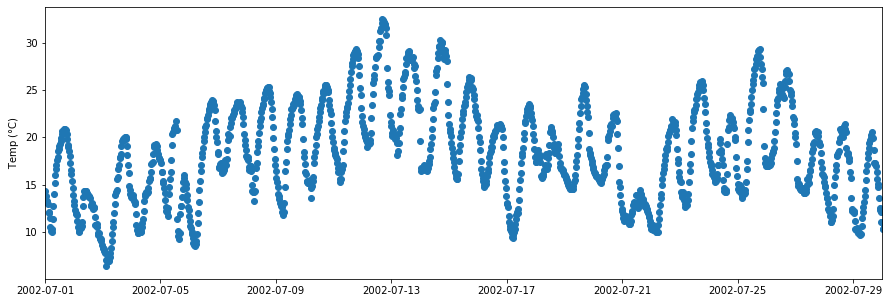
Sometimes we want to plot points instead of lines, specially for time series when you have a lot of missing points. You can do this by using plt.scatter as follows:
[76]:
Y=df_sub['TA']
X=df_sub.index

fig,ax=plt.subplots(1,1,figsize=(15,5))
plt.scatter(X,Y)
plt.xlim([df_sub.index.date.min(),df_sub.index.date.max()])
plt.ylabel('Temp ($\degree$C)')
[76]:
Text(0, 0.5, 'Temp ($\\degree$C)')
You can change the marker color and style (For different types of markers, please refer here):
[77]:
Y=df_sub['TA']
X=df_sub.index

fig,ax=plt.subplots(1,1,figsize=(15,5))
plt.scatter(X,Y,color='r',marker='+')
plt.xlim([df_sub.index.date.min(),df_sub.index.date.max()])
plt.ylabel('Temp ($\degree$C)')
[77]:
Text(0, 0.5, 'Temp ($\\degree$C)')
